
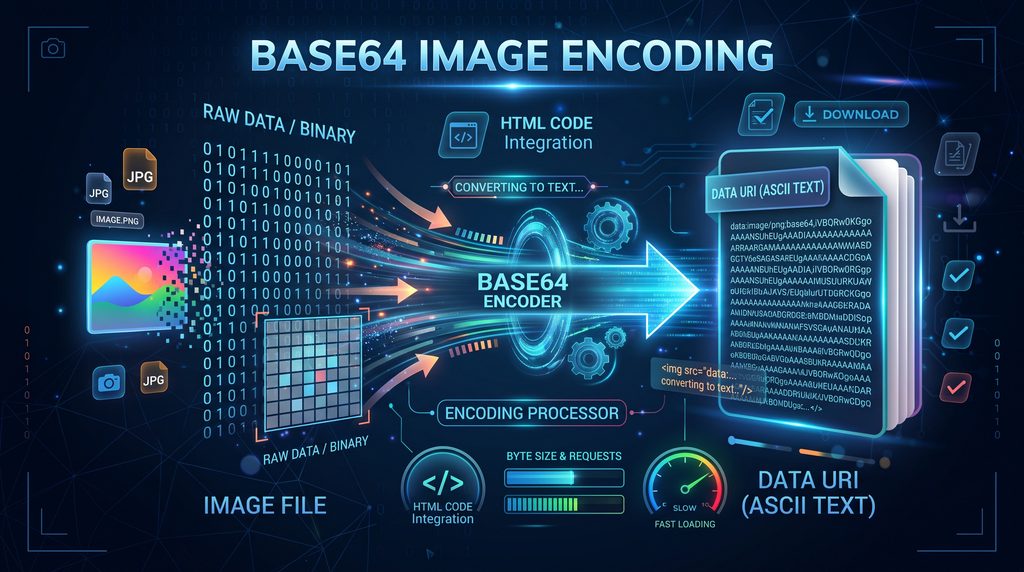
Every asset referenced in an HTML document—an icon, a photograph, or a background pattern—traditionally requires a separate HTTP request. Even on modern networks, dispatching dozens of round-trip network requests for tiny graphical assets can stall document rendering, delay your Largest Contentful Paint (LCP), and clutter developer pipelines.
To eliminate these micro-requests, developers frequently turn to Base64 image encoding—a method that turns raw binary image files into inline ASCII text strings embedded directly within HTML or CSS stylesheets.
However, inlining images comes with a strict mathematical tradeoff: your file weight expands by over 33%.
When does Base64 accelerate page delivery, when does it harm web performance, and how do you encode files locally without compromising data privacy? Here is your complete practical and technical breakdown.
1. Explain the Problem: The Overhead of Micro-Image Requests
To see why developers rely on Base64, consider how browsers assemble web pages:
- HTTP Request Bottlenecks: Every external image file linked via
<img src="icon.png">orurl('bullet.svg')forces the browser to establish a connection, send headers, and wait for a response. Even with HTTP/2 and HTTP/3 multiplexing, loading hundreds of 1 KB sprites or symbols introduces network queue congestion. - Flash of Unstyled Content (FOUC): When an icon or background image loads late, users see layout jumps or blank buttons while text renders first. Embedding the image directly in the CSS ensures critical UI elements appear simultaneously with the styles.
- Email Client Incompatibility: HTML email newsletters are notoriously fragile. Many modern email clients block external remote image URLs by default to prevent tracking, leaving marketing emails broken unless critical graphic signatures or logos are embedded directly.
- The Underlying Penalty: Base64 is not compression. Converting 8-bit binary chunks into safe 6-bit ASCII characters causes a mandatory ~33% increase in data size. If applied indiscriminately to large photographs, Base64 can slow browser rendering dramatically.
2. Demonstrate the Solution: Client-Side Base64 Image Encoder
Instead of uploading sensitive business logos, signatures, or confidential design assets to ad-supported cloud conversion sites, you can generate clean Data URIs directly inside your browser. The code below runs entirely in memory without contacting an external server.
Standalone HTML/JS Base64 Converter Tool
Save this script as base64-tool.html on your computer and open it in any web browser:
HTML
<!DOCTYPE html>
<html lang="en">
<head>
  <meta charset="UTF-8">
  <title>Browser-Side Base64 Image Encoder</title>
  <style>
    body { font-family: system-ui, -apple-system, sans-serif; max-width: 680px; margin: 40px auto; padding: 20px; color: #1e293b; line-height: 1.5; }
    .dropzone { border: 2px dashed #0284c7; padding: 35px 20px; text-align: center; border-radius: 10px; background: #f0f9ff; cursor: pointer; }
    .controls { margin-top: 20px; display: flex; flex-direction: column; gap: 10px; }
    textarea { width: 100%; height: 130px; padding: 10px; border: 1px solid #cbd5e1; border-radius: 6px; font-family: monospace; font-size: 12px; resize: vertical; box-sizing: border-box; }
    .btn-group { display: flex; gap: 10px; }
    button { background: #0284c7; color: #fff; border: none; padding: 10px 16px; border-radius: 6px; font-weight: 600; cursor: pointer; }
    button:disabled { background: #94a3b8; cursor: not-allowed; }
    .stats { font-size: 13px; color: #64748b; margin-top: 5px; }
    .preview { margin-top: 15px; text-align: center; }
    .preview img { max-width: 150px; max-height: 150px; border: 1px solid #cbd5e1; border-radius: 4px; padding: 4px; }
  </style>
</head>
<body>
  <h2>Client-Side Base64 Image Encoder</h2>
  <p>Convert any image into an inline Data URI string instantly. No server uploads.</p>

  <div class="dropzone" id="dropArea">Click or Drop Image Here (.png, .svg, .jpg, .webp)</div>
  <input type="file" id="filePicker" accept="image/*" style="display: none;">

  <div class="controls" id="outputSection" style="display: none;">
    <div class="preview"><img id="imagePreview" alt="Preview"></div>
    <div class="stats" id="statsDisplay"></div>

    <label for="base64Result"><strong>Base64 Data URI:</strong></label>
    <textarea id="base64Result" readonly></textarea>

    <div class="btn-group">
      <button id="copyBtn">Copy Data URI</button>
      <button id="copyCssBtn">Copy as CSS Background</button>
    </div>
  </div>

  <script>
    const dropArea = document.getElementById('dropArea');
    const filePicker = document.getElementById('filePicker');
    const outputSection = document.getElementById('outputSection');
    const base64Result = document.getElementById('base64Result');
    const imagePreview = document.getElementById('imagePreview');
    const statsDisplay = document.getElementById('statsDisplay');
    const copyBtn = document.getElementById('copyBtn');
    const copyCssBtn = document.getElementById('copyCssBtn');

    dropArea.onclick = () => filePicker.click();
    filePicker.onchange = (e) => processFile(e.target.files[0]);

    function processFile(file) {
      if (!file) return;
      const reader = new FileReader();
      reader.onload = (e) => {
        const dataUri = e.target.result;
        base64Result.value = dataUri;
        imagePreview.src = dataUri;

        const originalBytes = file.size;
        const encodedBytes = dataUri.length;
        const inflation = (((encodedBytes - originalBytes) / originalBytes) * 100).toFixed(1);

        statsDisplay.innerHTML = `Original: <strong>${(originalBytes / 1024).toFixed(2)} KB</strong> | Base64: <strong>${(encodedBytes / 1024).toFixed(2)} KB</strong> (+${inflation}% size)`;
        outputSection.style.display = 'flex';
      };
      reader.readAsDataURL(file);
    }

    copyBtn.onclick = () => {
      base64Result.select();
      navigator.clipboard.writeText(base64Result.value);
      copyBtn.innerText = "Copied!";
      setTimeout(() => copyBtn.innerText = "Copy Data URI", 2000);
    };

    copyCssBtn.onclick = () => {
      const cssString = `background-image: url("${base64Result.value}");`;
      navigator.clipboard.writeText(cssString);
      copyCssBtn.innerText = "CSS Copied!";
      setTimeout(() => copyCssBtn.innerText = "Copy as CSS Background", 2000);
    };
  </script>
</body>
</html>
3. Technical Breakdown: How Base64 Encoding Works
Computers store media files as raw binary data (sequences of 8-bit bytes). However, traditional web transmission protocols like early SMTP (email) and plain text containers are designed exclusively for 7-bit ASCII characters. Sending raw binary through plain-text channels often causes data corruption when control characters are stripped.
Base64 bridges this gap by mapping raw binary bits into a standardized set of 64 printable characters (A–Z, a–z, 0–9, +, and /).
The 4-for-3 Byte Math
Base64 groups binary data into chunks of 3 bytes (24 bits) and reorganizes them into 4 groups of 6 bits:
$$\text{Input: } 3 \text{ bytes } \times 8 \text{ bits} = 24 \text{ bits} \longrightarrow \text{Output: } 4 \text{ characters } \times 6 \text{ bits} = 24 \text{ bits}$$
Because every 3 bytes of raw binary produce 4 ASCII text characters, the resulting text string is mathematically guaranteed to be at least 33.3% larger than the source file:
$$\text{Encoded Size} \approx \lceil \frac{n}{3} \rceil \times 4$$
If the input binary length is not divisible by 3, padding characters (=) are appended to the end of the string to complete the 4-character block.
Anatomy of a Data URI
When embedding an image into an HTML page or stylesheet, the string is formatted with a specific prefix:
Plaintext
data:image/png;base64,iVBORw0KGgoAAAANSUhEUgAAAAUA...
│    │         │      │
│    │         │      └─ Raw Base64 string payload
│    │         └──────── Encoding marker
│    └────────────────── MIME type of original asset
└─────────────────────── Scheme identifier
4. Decision Matrix: When to Use Base64 (And When to Avoid It)
| Scenario / Asset Type | Use Base64? | Why / Performance Impact |
| Small UI icons (< 2 KB) | Yes | Eliminates HTTP request latency for immediate interface rendering. |
| Critical SVG shapes & arrows | Yes | Inlines design assets into CSS to avoid Flash of Unstyled Content (FOUC). |
| HTML email newsletters | Yes | Bypasses external image blockers in restrictive desktop email clients. |
| Hero images & photography | No | Increases file size by 33%+; blocks HTML document parsing and hurts LCP. |
| Dynamic gallery images | No | Base64 cannot be cached independently from the HTML document. |
| Multi-page shared assets | No | Forcing identical Base64 strings across 10 pages means re-downloading it 10 times. |
Performance & Troubleshooting Pitfalls
- Cache Inefficiency: Standalone image files (
.webp,.jpg) are cached by the browser after the initial visit. If you inline a 200 KB image into your HTML document, the browser cannot cache that image separately—every page reload forces the user to re-download the payload within the HTML markup. - Main Thread Blocking: Extremely long Base64 strings require CPU cycles to parse and decode from text back into bitmap buffers before painting to the screen, degrading your site’s Interaction to Next Paint (INP) metric.
- Gzip/Brotli Mitigation: While text compression algorithms (Gzip or Brotli) can compress repetitive Base64 ASCII strings, the compressed payload is still consistently larger than the equivalent binary image served natively.
5. Frequently Asked Questions (FAQ)
Does Base64 compression reduce image file size?
No. Base64 is an encoding format, not a compression algorithm. It consistently increases the image payload size by approximately 33% compared to the original binary file. To reduce file size, compress the image (e.g., to WebP or AVIF) before encoding it to Base64.
Can search engines index Base64 images?
Googlebot can read and parse Base64 inline images inside standard <img> tags. However, images embedded via CSS background-image: url("data:...") or Base64 strings inside complex JavaScript bundles rarely rank in Google Image Search results. Use standard image files with descriptive file names and alt attributes for SEO-critical visuals.
What is the maximum recommended file size for Base64 inlining?
A practical rule of thumb is under 2 KB to 5 KB. Inlining small decorative icons, loaders, and badges saves more network round-trip time than the minor 33% size penalty costs. Anything larger than 5 KB should remain an external, cacheable asset.